

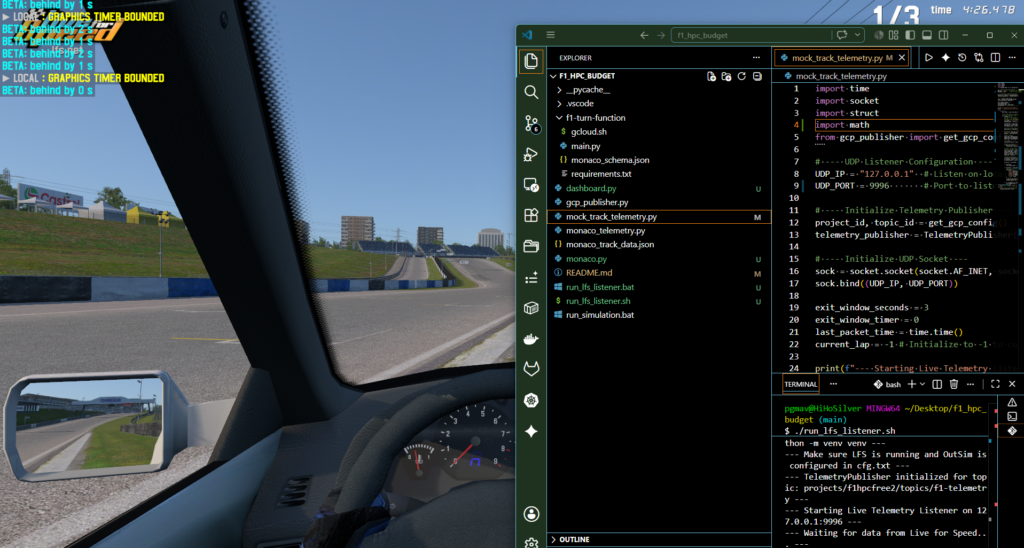
Summarizing Data Flow
There are (4) files involved in the collecting of telemetry from the LFS simulator:
-
- cfg.txt – outflow needs to be modified to communicate w/
mock_track_telemetry.py
- cfg.txt – outflow needs to be modified to communicate w/
-
- mock_track_telemetry.py: This script runs a UDP server that listens for the packets sent by the LFS game on port 9996 and receives the data from the simulator.
-
- gcp_publisher.py: This file communicates w/ GCP. It contains the
TelemetryPublisherclass, which acts as a robust wrapper around the official Google Cloud client library. It’s this file’s job to actually send the data.
- gcp_publisher.py: This file communicates w/ GCP. It contains the
-
- main.py: Activates the google cloud function that places the data in Big Query.
Step-by-Step
LFS Game -> mock_track_telemetry.py -> gcp_publisher.py -> Google Cloud Pub/Sub -> f1-turn-function in main.py-> Google Cloud BigQuery
-
mock_track_telemetry.pyReceives Data: This script runs a UDP server that listens for the packets sent by the LFS game.
-
mock_track_telemetry.pyUses the Publisher: After receiving and processing a data packet,mock_track_telemetry.pyuses a helper class calledTelemetryPublisherto handle the cloud communication. You can see this in the code:python Show full code block# c:\Users\pgmav\Desktop\f1_hpc_budget\mock_track_telemetry.py # It imports the class from the other file from gcp_publisher import get_gcp_config, TelemetryPublisher # It creates an instance of the publisher telemetry_publisher = TelemetryPublisher(project_id, topic_id) # ... later in the loop, it calls the publish method telemetry_publisher.publish(data_point)
Communicating w/ GCP
The gcp_publisher.py script is the bridge from your local machine to the Google Cloud ecosystem.
-
- It initializes the
pubsub_v1.PublisherClient.
- It initializes the
-
- Its
publishmethod takes your data, encodes it, and sends it to your Google Cloud Pub/Sub topic (f1-telemetry).
- Its
-
- Google Cloud Function (
f1-turn-function/main.py) Takes Over: Once the data arrives in the Pub/Sub topic, a serverless Google Cloud Function is automatically triggered. This function:
-
- Reads the new message from the Pub/Sub topic.
-
- Validates the data to make sure it’s in the correct format.
-
- Inserts the validated data as a new row into your BigQuery table (
f1_analysis.monaco_data).
- Inserts the validated data as a new row into your BigQuery table (
-
- Google Cloud Function (
Scripts
// cfg.txt: OutSim configuration changes to receive telemetry from LFS

Version 0.8C11
...
...
OutSim Mode 2
OutSim Delay 1
OutSim IP 127.0.0.1
OutSim Port 9996
OutSim ID 0
OutSim Opts 0
...
// mock_track_telemetry.py

import time
import socket
import struct
import math
from gcp_publisher import get_gcp_config, TelemetryPublisher

# --- UDP Listener Configuration ---
UDP_IP = "127.0.0.1"  # Listen on localhost
UDP_PORT = 9996       # Port to listen for LFS OutSim packets (must match cfg.txt)

# --- Initialize Telemetry Publisher ---
project_id, topic_id = get_gcp_config()
telemetry_publisher = TelemetryPublisher(project_id, topic_id)

# --- Initialize UDP Socket ---
sock = socket.socket(socket.AF_INET, socket.SOCK_DGRAM)
sock.bind((UDP_IP, UDP_PORT))

exit_window_seconds = 3
exit_window_timer = 0
last_packet_time = time.time()
current_lap = -1 # Initialize to -1 to correctly capture the first lap (lap 0)

print(f"--- Starting Live Telemetry Listener on {UDP_IP}:{UDP_PORT} ---")
print("--- Waiting for data from Live for Speed... ---")
try:
    while True:
        data, addr = sock.recvfrom(1024)

        # The IS_OSC packet for OutSim Mode 2 is 72 bytes long.
        # We first check the length and then unpack the payload, skipping the 4-byte header.
        if len(data) == 72:
            # Format for the IS_OSC packet payload (68 bytes).
            # We use 'x' to pad/skip bytes for vectors we don't need (AngVel, Accel, Pos).
            # Format: Time, 12x(AngVel), 3h(H,P,R), 12x(Accel), 3f(Vel), 12x(Pos), H(Steer), 4B(T,B,C,G), 2x, H(Lap)
            osc_format = '<I 12x 3h 12x 3f 12x H 4B 2x H'
            unpacked_data = struct.unpack(osc_format, data[4:]) # Skip 4-byte header

            current_time = time.time()
            time_delta = current_time - last_packet_time
            last_packet_time = current_time

            # Extract relevant data points from the LFS packet
            game_time_ms = unpacked_data[0]

            # Velocity vector (vx, vy, vz) in m/s. We calculate the magnitude for speed.
            vx, vy, vz = unpacked_data[4], unpacked_data[5], unpacked_data[6]
            speed_ms = math.sqrt(vx**2 + vy**2 + vz**2)

            # Input controls
            steer_raw = unpacked_data[7]      # Steering: 0-65535 (32768 is center)
            throttle_raw = unpacked_data[8]   # Throttle: 0-255
            brake_raw = unpacked_data[9]      # Brake: 0-255

            # Lap data
            lap_count_from_sim = unpacked_data[12] # Number of laps completed

            # Update lap number if it has changed in the sim (LFS reports completed laps)
            if lap_count_from_sim > current_lap:
                current_lap = lap_count_from_sim

            # Convert raw LFS values to standardized units for your pipeline
            # Steer is 0-65535, center 32768. Normalize to -1.0 to 1.0 then scale.
            steer_normalized = (steer_raw - 32768) / 32767.0
            steer_angle_deg = steer_normalized * 450.0 # Assuming ~450 deg max lock
            throttle = throttle_raw / 255.0
            brake = brake_raw / 255.0
            speed_mph = speed_ms * 2.23694

            # Define conditions for "interesting" data to save costs
            is_turning = abs(steer_angle_deg) > 15
            is_braking = brake > 0.10
            is_accelerating = throttle > 0.95

            is_active = is_turning or is_braking or is_accelerating

            if is_active:
                exit_window_timer = exit_window_seconds

            if is_active or exit_window_timer > 0:
                # We add 1 to lap_count_from_sim because it reports completed laps
                data_point = {
                    "lap": current_lap + 1,
                    "time": game_time_ms / 1000.0, # Use in-game time for accuracy (in seconds)
                    "steering": steer_angle_deg,
                    "speed": speed_mph,
                    "throttle": throttle,
                    "brake": brake
                }
                # The publish method is now asynchronous and adds the message to a batch.
                telemetry_publisher.publish(data_point)
                print(f"QUEUED (Lap {current_lap + 1}) -> Speed: {speed_mph:.1f} | Steer: {steer_angle_deg:.1f} | Thr: {throttle:.2f} | Brk: {brake:.2f}")

            if not is_active and exit_window_timer > 0:
                exit_window_timer -= time_delta
except KeyboardInterrupt:
    print("\n--- Listener stopped by user. ---")
finally:
    # The finally block ensures that we flush any pending messages before exiting.
    telemetry_publisher.flush()
// gcp-publisher.py

import json
import os
import time
from concurrent.futures import TimeoutError
from google.cloud import pubsub_v1
from google.api_core import retry


def get_gcp_config():
    """
    Retrieves GCP configuration from environment variables with sensible defaults.
    """
    project_id = os.environ.get("GCP_PROJECT_ID", "f1hpcfree2")
    topic_id = os.environ.get("GCP_TOPIC_ID", "f1-telemetry")
    return project_id, topic_id


class TelemetryPublisher:
    """
    A robust wrapper for publishing telemetry data to Google Cloud Pub/Sub.
    This version uses batching to improve performance and reduce cost.
    """
    def __init__(self, project_id, topic_id):
        # Batch settings control how the client collects messages before sending them.
        # This sends batches of up to 100 messages or waits up to 0.25 seconds.
        batch_settings = pubsub_v1.types.BatchSettings(
            max_messages=100,
            max_latency=0.25,
        )
        # Define a retry policy for transient gRPC errors.
        # This makes the publisher more resilient to temporary network issues.
        self.default_retry = retry.Retry(
            initial=0.25, maximum=90.0, multiplier=1.45, deadline=300.0
        )
        self.publisher = pubsub_v1.PublisherClient(batch_settings=batch_settings)
        self.topic_path = self.publisher.topic_path(project_id, topic_id)
        self.publish_futures = []
        print(f"--- TelemetryPublisher initialized for topic: {self.topic_path} ---")

    def publish(self, data_point):
        """
        Adds a single data point to the batch to be published.
        This method is now asynchronous and does not block.
        """
        data_payload = json.dumps(data_point).encode("utf-8")
        future = self.publisher.publish(self.topic_path, data_payload, retry=self.default_retry)
        # Add a callback to handle the result of the publish operation.
        future.add_done_callback(self._get_callback(future, data_point))
        self.publish_futures.append(future)

    def _get_callback(self, future, data_point):
        """Wrapper to create a callback function to report publish results."""
        def callback(future):
            # When the callback is executed, the future is complete.
            # We can check for an exception to see if the publish call failed.
            if future.exception():
                print(f"[ERROR] Failed to publish data point {data_point}: {future.exception()}")

        return callback

    def flush(self):
        """
        Blocks until all outstanding messages have been published.
        This should be called at the end of the script to ensure no data is lost.
        """
        if not self.publish_futures:
            return  # Nothing to flush

        print(f"--- Flushing {len(self.publish_futures)} outstanding messages... ---")
        # Create a copy and clear the instance list to avoid race conditions
        # if publish() is called from another thread.
        futures_to_wait = self.publish_futures[:]
        self.publish_futures.clear()

        # Wait for all futures to complete using concurrent.futures.wait
        from concurrent.futures import wait
        done, not_done = wait(futures_to_wait, timeout=30.0)

        if not_done:
            print(f"[ERROR] Timed out waiting for {len(not_done)} messages to publish.")

        # The callback handles individual failures, so we just need to confirm completion.
        # You could add more detailed error checking on the 'done' set if needed.

        if not not_done:
            print("--- All messages flushed successfully. ---")
//main.py

import base64
import json
from google.cloud import bigquery
import os
import logging
import functions_framework
from pydantic import BaseModel, ValidationError

# Initialize the BigQuery client once outside the function to save execution time
bq_client = bigquery.Client()

# Define the expected data structure using Pydantic for automatic validation.
# This makes the expected schema explicit and provides robust type casting.
class TelemetryData(BaseModel):
    lap: int
    time: float
    steering: float
    speed: float
    throttle: float
    brake: float

@functions_framework.cloud_event
def process_turn_data(cloud_event):
    # 1. Extract and decode the message from Pub/Sub
    pubsub_message = cloud_event.data["message"]
    if "data" not in pubsub_message:
        logging.warning("No 'data' field in the Pub/Sub message.")
        return "Warning: No data in message.", 400

    raw_data = base64.b64decode(pubsub_message["data"]).decode("utf-8")
    telemetry = json.loads(raw_data)

    try:
        # 2. Validate and parse the incoming data using the Pydantic model.
        validated_data = TelemetryData(**telemetry)
        row_to_insert = [validated_data.model_dump()]

        # 3. Get the target table from an environment variable for flexibility.
        #    Fall back to a default if the variable is not set.
        table_id = os.environ.get("BIGQUERY_TABLE_ID", "f1hpcfree2.f1_analysis.monaco_data")
        if not table_id:
            logging.critical("CRITICAL: BIGQUERY_TABLE_ID environment variable not set.")
            # Raising an exception will cause the function to fail and Pub/Sub to retry.
            raise ConnectionError("Configuration error: Missing BIGQUERY_TABLE_ID")

        # 4. Stream-insert the data row into BigQuery
        errors = bq_client.insert_rows_json(table_id, row_to_insert)

        if errors == []:
            logging.info(f"Successfully logged data: {row_to_insert}")
        else:
            # If there are errors, log them and raise an exception to trigger a retry.
            logging.error(f"BigQuery insertion errors: {errors}")
            raise ConnectionError(f"BigQuery insertion failed: {errors}")

    except ValidationError as e:
        logging.error(f"Data validation error: {e}. Raw data: {telemetry}")
        # Do not retry on malformed data; return an error to stop processing.
        return f"Bad Request: Invalid telemetry data format - {e}", 400

    return "OK"