


According to Gemini, Caching is the temporary storage of frequently used data in a fast, easy-to-reach location—such as CPU memory, RAM, or a local browser folder—so future requests can be answered much faster. It helps programs run smoothly by avoiding slow trips to a main database or remote server. Whether your utilizing caching at an edge location closer to the end-user or speeding up a pipeline, it can speed up additional requests by a significant amount depending on the size of the files or packet.
Solution
When building a pipeline, one of the most common mistakes I see is the repeated downloading of a dependency file that typically slows down pipelines by 1/3. By adding a global cache in your .yaml script, you can speed up the pipeline with a few lines of code.
variables:
  PIP_CACHE_DIR: "$CI_PROJECT_DIR/.cache/pip"

cache:
  key:
    files:
      - requirements.txt
  paths:
    - .cache/pip
Pipeline vs. Application Fix
Whether your using a requirements.txt file in a Python application or package.json file for an Angular Framework, I prefer to always correct the dependency problems in the application. The code in a package.json or requirments.txt file is only one line of code. Ex. fastapi==0.111.0 vs. 4 lines of code to perform the same download in the pipeline. This creates excessive bloating in the pipeline which makes your .yaml file (either monolithic or modular) bloated and cluttered. The solution is to create a routine process where the Lead DevOps Engineer and Lead Software Engineer coordinate on the next merge to add the dependencies in the application.
anyio==4.3.0
bandit==1.7.8
bcrypt==4.1.2
celery==5.4.0
certifi==2024.2.2
cffi==1.16.0
click==8.1.7
click-didyoumean==0.3.0
click-plugins==1.1.1
click-repl==0.3.0
colorama==0.4.6
cryptography==42.0.5
ecdsa==0.18.0
Changes
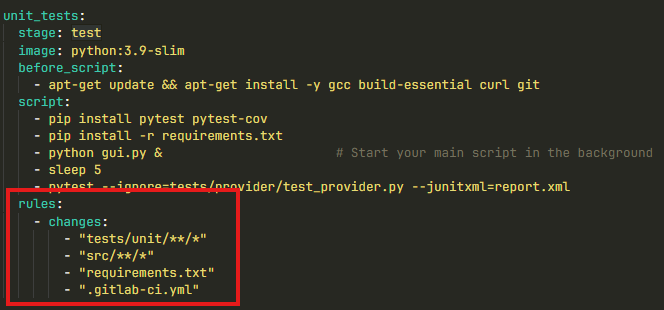
In GitLab CI/CD, the structure under rules: using changes: is referred to as conditional execution rules based on file changes (or file path matching rules).
Specifically:
rules:is an array of conditional statements that determine whether a job is created and added to the pipeline.changes:is a rule clause (or rule condition) used to evaluate whether specific files or file paths have been modified in a commit or merge request.
Problem
You will find that when testing, the pipeline may fail, especially after a significant change in the head / main repository. More than likely, this happens following a merge request where new features are introduced and others may have been removed.
Ex. When a smoke test fails in a pipeline only after a merge request (MR) is merged—and caching is suspected—it is almost always because the cache was saved with outdated or stale artifacts during the branch/MR run, and then reused on the target branch (e.g., main).
Here are the most common reasons why caching causes post-merge failures and how to fix them:
1. Stale Cache from the Source Branch
- The Cause: When a cache key is static (like
key: python-cacheorkey: "$CI_COMMIT_REF_SLUG"), the pipeline reuses dependencies downloaded in earlier runs or previous branches. If a dependency was added, upgraded, or removed in the MR, the pipeline onmainmight pull down a cached environment that still has the old package versions or missing files. - The Fix: Base your cache key on a file hash using
key: files:YAMLcache: key: files: - requirements.txt # Or poetry.lock, package-lock.json, etc. paths: - .cache/pipThis guarantees a brand-new cache key is created every time dependencies change.
2. Incomplete or Corrupted Local Build Artifacts Cached
- The Cause: If your cache paths include compiled code or build outputs (e.g.,
.pytest_cache/,node_modules/,__pycache__/, ordist/) instead of just downloaded package archives, stale build outputs from the MR branch might overwrite or conflict with fresh code onmain. - The Fix: Only cache downloaded dependency packages (like
.cache/pipor~/.npm), never build artifacts or compiled binaries. Useartifacts:passing for step-to-step build files instead ofcache:.
3. Cache Fallback Behavior
- The Cause: GitLab CI/CD falls back to the default or master branch cache if a job-specific cache isn’t found. If the job on the MR branch didn’t generate a cache (or had a mismatch), the post-merge run might inherit a fallback cache containing obsolete dependencies.
- The Fix: Ensure your pipeline runs a clean installation step (e.g.,
pip install -r requirements.txt) even when a cache is restored, so package managers can update any mismatched packages in the cached directory.
4. pull-push Cache Policy Issues
- The Cause: By default, GitLab CI uses
policy: pull-push, meaning every pipeline downloads the cache at the start and uploads/overwrites the cache at the end. If the MR pipeline ran with temporary or local modifications, it might have overwritten the central cache before merging. - The Fix: Separate cache producers from consumers:
- In setup/build jobs: Use
policy: pull-push. - In test/smoke-test jobs: Use
policy: pullso test runs only read the cache and never accidentally pollute it.
- In setup/build jobs: Use
Quick Troubleshooting Step
To verify if caching is the culprit:
- Go to your project’s CI/CD > Pipelines in GitLab.
- Click Clear runner caches (top right).
- Re-run the post-merge pipeline on
main.
If it passes, your cache key strategy needs to be updated to auto-invalidate when dependencies change.