


I wanted to delve into re-creating my version of BMW’s software development environment for 10,000+ Software Developers using BMW Software Factory; *an internal DevOps platform and developer toolchain used by the BMW Group to manage software development for its regional technology hubs. Keep in mind this setup is for one region but realistically you’ll have to run smaller setups for several regions across the world. Let’s begin. Note: All Code (Dockerfile, YAML and Terraform) has NOT been tested!
Docker Integration
There’s (2) ways to do this:
Dockerfile
FROM debian:bookworm-slim

# Set environment variables for the BMW Software Factory mock app
ENV APP_NAME="BMW-Software-Factory"
ENV APP_HOME="/opt/bmw-factory"

# Install essential build tools and dependencies
RUN apt-get update && apt-get install -y \
    curl \
    git \
    build-essential \
    && rm -rf /var/lib/apt/lists/*

# Create application directory
WORKDIR $APP_HOME

# Copy your mock application source code
COPY . .

# Set a default command to run your mock app
CMD ["/bin/bash"]
- Run the following command using Colima (MacOS) or Moby (Windows): docker build -t BMW_Software_Factory .
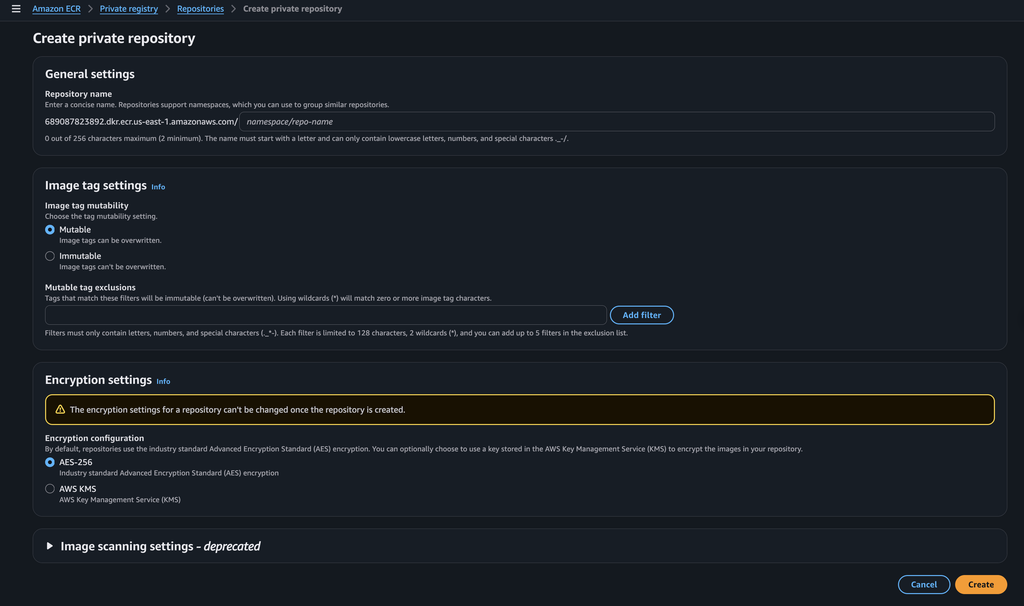
- Connect to AWS CLI and push the image to AWS ECR.
Create the Cloud Infrastructure
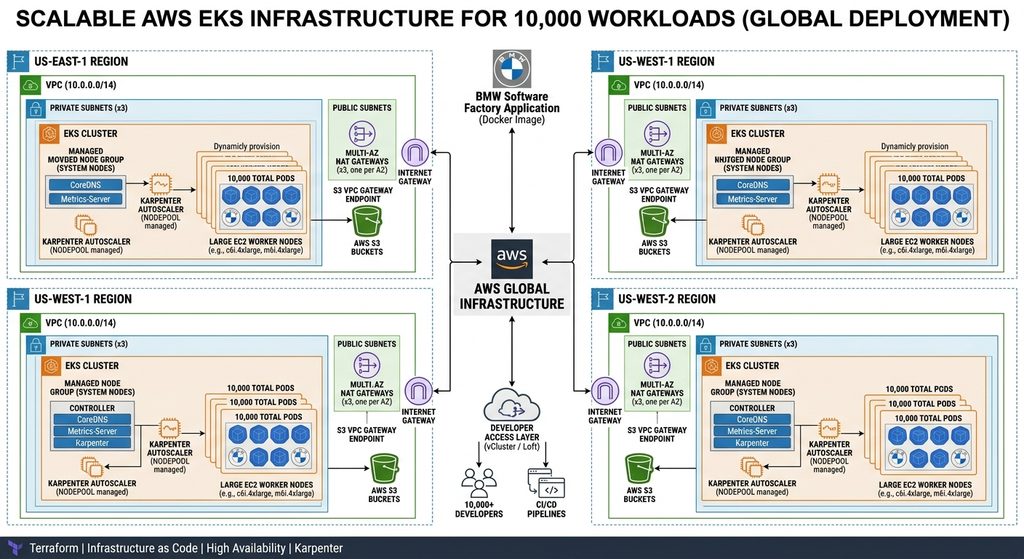
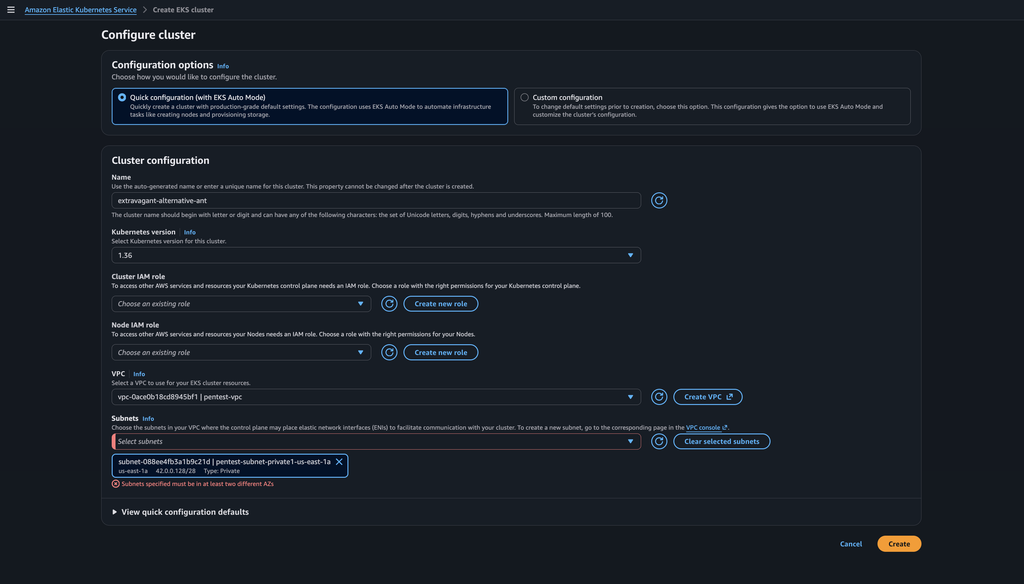
Next, using Terraform, provision (create) a VPC and EKS cluster. Note: Rather than 10,000 nodes for one Region, create several .tf files for more than one region.
terraform {
  required_version = ">= 1.3.0"

  required_providers {
    aws = {
      source  = "hashicorp/aws"
      version = "~> 5.0"
    }
    kubernetes = {
      source  = "hashicorp/kubernetes"
      version = "~> 2.20"
    }
    helm = {
      source  = "hashicorp/helm"
      version = "~> 2.10"
    }
  }
}

provider "aws" {
  region = var.aws_region
}

# --- Variables ---

variable "aws_region" {
  description = "AWS Region to deploy resources"
  type        = string
  default     = "us-east-1"
}

variable "cluster_name" {
  description = "Name of the EKS Cluster"
  type        = string
  default     = "my-highscale-cluster"
}

variable "container_image" {
  description = "Container image for dev workloads"
  type        = string
  default     = "nginx:alpine" # Replace with your registry image
}

variable "replica_count" {
  description = "Number of container replicas to launch"
  type        = number
  default     = 10000
}

# --- Data Sources ---

data "aws_availability_zones" "available" {
  state = "available"
}

# --- VPC Module ---
# /14 CIDR + Multi-AZ NAT Gateways to prevent network bottlenecks and SNAT exhaustion

module "vpc" {
  source  = "terraform-aws-modules/vpc/aws"
  version = "~> 5.0"

  name = "${var.cluster_name}-vpc"
  cidr = "10.0.0.0/14"

  azs             = slice(data.aws_availability_zones.available.names, 0, 3)
  private_subnets = ["10.0.0.0/18", "10.0.64.0/18", "10.0.128.0/18"]
  public_subnets  = ["10.0.192.0/24", "10.0.193.0/24", "10.0.194.0/24"]

  enable_nat_gateway     = true
  single_nat_gateway     = false
  one_nat_gateway_per_az = true # Dedicated outbound bandwidth per AZ
  enable_dns_hostnames   = true

  public_subnet_tags = {
    "kubernetes.io/role/elb" = "1"
  }

  private_subnet_tags = {
    "kubernetes.io/role/internal-elb" = "1"
    "karpenter.sh/discovery"          = var.cluster_name
  }
}

# --- EKS Module ---

module "eks" {
  source  = "terraform-aws-modules/eks/aws"
  version = "~> 20.0"

  cluster_name    = var.cluster_name
  cluster_version = "1.30"

  cluster_endpoint_public_access           = true
  enable_cluster_creator_admin_permissions = true

  vpc_id     = module.vpc.vpc_id
  subnet_ids = module.vpc.private_subnets

  # Scaled System Nodes to ensure CoreDNS and Karpenter controllers don't OOM
  eks_managed_node_groups = {
    system_nodes = {
      min_size       = 3
      max_size       = 10
      desired_size   = 3
      instance_types = ["m6i.2xlarge"] # 8 vCPU, 32GB RAM per node
      capacity_type  = "ON_DEMAND"

      labels = {
        "workload-type" = "system"
      }
    }
  }

  tags = {
    Environment = "production"
    ScaleTarget = "10k-workloads"
    Terraform   = "true"
  }
}

# --- Helm & Kubernetes Providers ---

data "aws_eks_cluster_auth" "cluster" {
  name = module.eks.cluster_name
}

provider "kubernetes" {
  host                   = module.eks.cluster_endpoint
  cluster_ca_certificate = base64decode(module.eks.cluster_certificate_authority_data)
  token                  = data.aws_eks_cluster_auth.cluster.token
}

provider "helm" {
  kubernetes {
    host                   = module.eks.cluster_endpoint
    cluster_ca_certificate = base64decode(module.eks.cluster_certificate_authority_data)
    token                  = data.aws_eks_cluster_auth.cluster.token
  }
}

# --- Karpenter Autoscaler Installation ---
# Karpenter efficiently bin-packs 10,000 workloads into scalable EC2 instances

resource "helm_release" "karpenter" {
  namespace        = "karpenter"
  create_namespace = true
  name             = "karpenter"
  repository       = "oci://public.ecr.aws/karpenter"
  chart            = "karpenter"
  version          = "0.37.0"

  set {
    name  = "settings.clusterName"
    value = module.eks.cluster_name
  }

  set {
    name  = "settings.clusterEndpoint"
    value = module.eks.cluster_endpoint
  }

  depends_on = [module.eks]
}

# --- Workload Deployment ---

resource "kubernetes_namespace" "workload" {
  metadata {
    name = "workload"
  }
}

resource "kubernetes_deployment" "large_scale_app" {
  metadata {
    name      = "container-app"
    namespace = kubernetes_namespace.workload.metadata[0].name
  }

  spec {
    replicas = var.replica_count

    selector {
      match_labels = {
        app = "container-app"
      }
    }

    template {
      metadata {
        labels = {
          app = "container-app"
        }
      }

      spec {
        affinity {
          pod_anti_affinity {
            preferred_during_scheduling_ignored_during_execution {
              weight = 100
              pod_affinity_term {
                label_selector {
                  match_expressions {
                    key      = "app"
                    operator = "In"
                    values   = ["container-app"]
                  }
                }
                topology_key = "kubernetes.io/hostname"
              }
            }
          }
        }

        container {
          image = var.container_image
          name  = "app-container"

          resources {
            limits = {
              cpu    = "250m"
              memory = "512Mi"
            }
            requests = {
              cpu    = "250m"
              memory = "512Mi"
            }
          }
        }
      }
    }
  }

  depends_on = [helm_release.karpenter]
}

# Protects cluster API from cascade failure during rolling restarts
resource "kubernetes_pod_disruption_budget" "app_pdb" {
  metadata {
    name      = "container-app-pdb"
    namespace = kubernetes_namespace.workload.metadata[0].name
  }
  spec {
    max_unavailable = "10%"
    selector {
      match_labels = {
        app = "container-app"
      }
    }
  }
}

# --- Outputs ---

output "cluster_name" {
  description = "EKS Cluster Name"
  value       = module.eks.cluster_name
}

output "cluster_endpoint" {
  description = "Endpoint for EKS control plane"
  value       = module.eks.cluster_endpoint
}
CI/CD Pipeline
Next, add the following deployment.yml file to the github repository:
// Deployment.yml

name: Build, Push to ECR, and Deploy to EKS

on:

  push:

    branches:

      - main

env:

  AWS_REGION: us-east-1                  # Update to your AWS region

  ECR_REPOSITORY: my-app-repo            # Update to your ECR repository name

permissions:

  id-token: write                        # Required for requesting the OIDC JWT token

  contents: read                         # Required to checkout the repository

jobs:

  deploy:

    name: Build & Deploy

    runs-on: ubuntu-latest

    steps:

      - name: Checkout Code

        uses: actions/checkout@v4

      - name: Configure AWS Credentials (via OIDC)

        uses: aws-actions/configure-aws-credentials@v4

        with:

          role-to-assume: ${{ secrets.AWS_ROLE_ARN }}

          aws-region: ${{ env.AWS_REGION }}

      - name: Log in to Amazon ECR

        id: login-ecr

        uses: aws-actions/amazon-ecr-login@v2

      - name: Build, Tag, and Push Image to ECR

        id: build-image

        env:

          ECR_REGISTRY: ${{ steps.login-ecr.outputs.registry }}

          IMAGE_TAG: ${{ github.sha }}

        run: |

          # Build container image

          docker build -t ECRREGISTRY/ECR_REPOSITORY:$IMAGE_TAG .

          docker tag ECRREGISTRY/ECR_REPOSITORY:$IMAGE_TAG ECRREGISTRY/ECR_REPOSITORY:latest

          # Push both specific commit tag and 'latest' to ECR

          docker push ECRREGISTRY/ECR_REPOSITORY:$IMAGE_TAG

          docker push ECRREGISTRY/ECR_REPOSITORY:latest

          # Output the image URI for downstream steps

          echo "image=ECRREGISTRY/ECR_REPOSITORY:$IMAGE_TAG" >> $GITHUB_OUTPUT

      - name: Update Kubeconfig for EKS

        run: |

          aws eks update-kubeconfig --region ${{ env.AWS_REGION }} --name ${{ secrets.EKS_CLUSTER_NAME }}

      - name: Deploy to EKS

        env:

          IMAGE_URI: ${{ steps.build-image.outputs.image }}

        run: |

          # Substitute the dynamic image tag into the deployment manifest and apply

          sed -i "s|image: .*|image: $IMAGE_URI|g" k8s/deployment.yaml

          kubectl apply -f k8s/

          # Verify rollout success (fails job if deployment gets stuck)

          kubectl rollout status deployment/my-app-deployment --timeout=180s
Accessing the Nodes
Once the cluster and nodes have the ECR image installed, Developer’s can access there assigned node from the command line:
kubectl exec -it <pod-name> — /bin/sh
Save your Work
By default, the node’s are stateless and will delete all work performed unless action is taken to save the state of the container as an image or into a storage. To save the state of the node (Docker Container), you can do this in one of two ways. Create a YAML file that saves the state into an EBS volume:
//save_node.yml

apiVersion: v1

kind: PersistentVolumeClaim

metadata:

  name: app-storage-pvc

spec:

  accessModes:

    - ReadWriteOnce

  resources:

    requests:

      storage: 10Gi

---

apiVersion: apps/v1

kind: Deployment

metadata:

  name: my-app

spec:

  template:

    spec:

      containers:

      - name: my-app

        image: <your-ecr-uri>

        volumeMounts:

        - mountPath: /app/data # Data written here persists on AWS EBS

          name: storage

      volumes:

      - name: storage

        persistentVolumeClaim:

          claimName: app-storage-pvc
Alternatively, Software Developer’s can create a copy of the running container which serves as a local snapshot or new image to be started the next workday:
docker commit <pod-name> BMW_Software_Factory:v1WARNING: Do NOT mistake the new image as one generated from the original code of BMW Software Factory. This new image should NOT be pushed back to ECR. IAM permissions for pushing and pulling to ECR should be limited to DevOps / Solutions Architect Team members for AWS best practices.